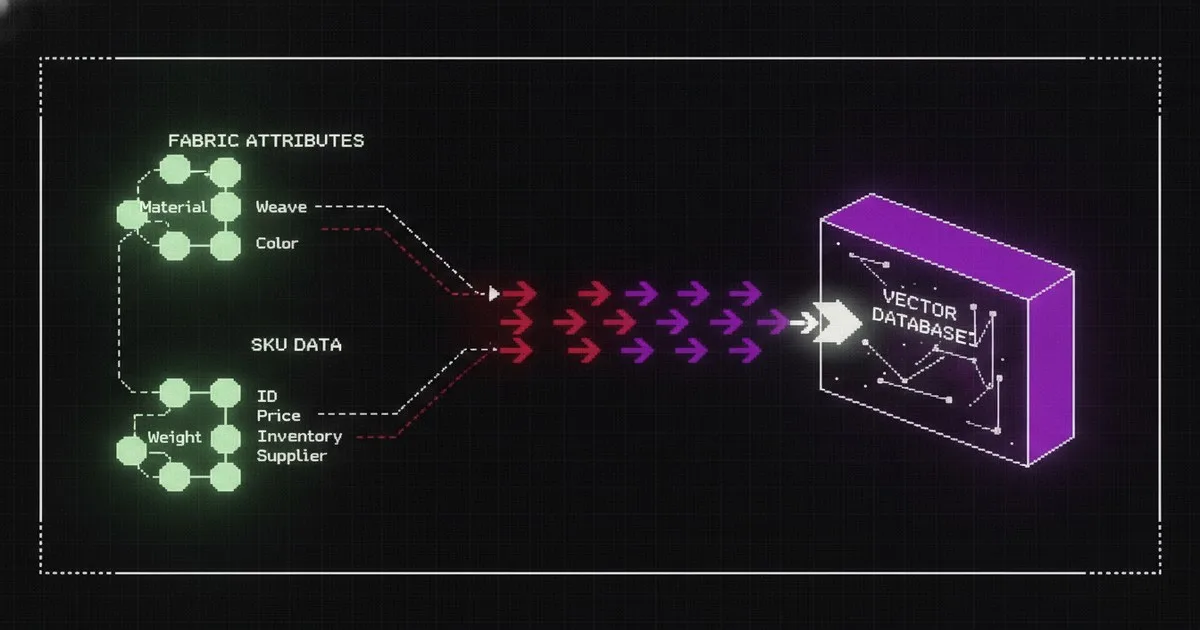
Building a Retrieval-Augmented Generation (RAG) pipeline for fashion requires more than a simple vector search over text blobs. To build a system that accurately answers queries about fabric composition, care instructions, and SKU-level attributes, you must implement a metadata-aware architecture. This guide explains how to architect a pipeline that preserves the structural integrity of garment data.
What you need
- Python 3.10+ environment with
langchainorllama-indexinstalled. - Azure OpenAI access for embedding models (e.g., text-embedding-3-small) and LLMs (GPT-4o).
- Databricks workspace for data engineering and vector storage via Mosaic AI Vector Search.
- Product Data Source: API access to Centric PLM or Backbone PLM.
- Schema Definition: A JSON representation of your product catalog (SKU, fabric, color, wash instructions).
Introduction
You will learn how to ingest structured fashion data from Product Lifecycle Management (PLM) systems, chunk it without losing attribute context, and store it in a vector database for high-precision retrieval. The outcome is a backend system capable of grounding an AI assistant in your actual product catalog, preventing the hallucinations common in generic LLM implementations.
Implementing an AI-native architecture is a fundamental business change, as seen with HireRoad, which updated its approach to legacy code on August 11, 2026. For fashion brands, this means moving beyond "AI-sprinkling" and building robust data pipelines that understand the nuances of a collection, such as the genderless designs recently showcased by Sander Lak on August 17, 2026.
Step 1: Extract and Normalize PLM Data
Connect to your source of truth, such as Centric PLM (now owned by Dassault Systèmes), to pull raw product specifications. You must normalize diverse data formats into a consistent JSON structure. Ensure that technical fields like "Fabric Composition" are treated as primary keys rather than just descriptive text.
Action: Write a script to fetch active SKUs and map their attributes to a flat JSON schema. Expected Result: A clean dataset where each garment has a unique identifier and a standardized list of technical specs.
Step 2: Implement Metadata-Aware Chunking
Standard character-based chunking often splits a fabric list (e.g., "98% Cotton, 2% Elastane") across two different vectors, destroying the semantic meaning. You must use a recursive character splitter that respects JSON boundaries or, preferably, a custom "Product Chunking" strategy where each chunk contains the full attribute set for one SKU.
Action: Configure your splitter to keep all attributes of a single product within a single 512-token window. Expected Result: Chunks that contain a complete "product card" rather than fragmented sentences.
Warning: Never allow a chunk to end in the middle of a care label. If the LLM only sees "Do not tumble," it may hallucinate the rest of the instruction.
Step 3: Generate Embeddings via Azure OpenAI
Use Azure OpenAI (now integrated into Microsoft Foundry) to convert your text chunks into high-dimensional vectors. Use the text-embedding-3-large model for better nuance in technical textile terminology.
Action: Initialize the Azure OpenAI client and batch-process your chunks through the embedding endpoint. Expected Result: A set of vectors representing the semantic space of your fashion catalog.
Step 4: Upsert to Databricks Vector Search
Store your vectors and their associated metadata in Databricks. Databricks provides a unified platform for scaling these workloads. By storing the raw attributes (color, size, material) alongside the vector, you enable hybrid search.
Action: Create a Delta Table in Databricks and synchronize it with a Vector Search Index. Expected Result: A searchable database where you can filter by "Brand" or "Season" before performing a semantic similarity search.
Step 5: Build the Hybrid Retrieval Loop
When a user asks, "What are our most sustainable jackets?", the system should first filter for the category "Jackets" using metadata, then perform a semantic search for "sustainable materials." Combine the results to ensure the LLM only sees relevant, high-quality data.
Action: Implement a retrieval function that takes a query, extracts filters, and queries the vector store. Expected Result: A ranked list of SKUs that match both the technical filters and the semantic intent of the user.
Step 6: Configure Generation Guardrails
Pass the retrieved context to the LLM. Instruct the model to only use the provided context and to state "Data not available" if the fabric composition is missing from the retrieved chunks. This is critical for maintaining trust in technical apparel contexts, such as those managed by Backbone PLM (now part of Bamboo Rose).
Action: Define a system prompt that enforces strict adherence to the retrieved product data. Expected Result: Accurate, grounded responses that cite specific SKU numbers and fabric percentages.
Comparison of Infrastructure Components
| Component | Best For | Technical Limit |
|---|---|---|
| Azure OpenAI | Enterprise-grade model hosting and security | Proprietary model dependency |
| Databricks | High-scale data engineering and agentic AI | Infrastructure management overhead |
| Centric PLM | Complex enterprise product lifecycles | API rate limits on legacy instances |
| Backbone PLM | Scale-up brands and private-label workflows | Slower post-acquisition feature velocity |
Troubleshooting Common Issues
- Issue: The system returns summer dresses when asked about winter coats.
- Fix: Check your metadata filtering. Ensure the "Season" attribute is being passed to the vector store query as a hard filter.
- Issue: Fabric percentages are hallucinated (e.g., 100% Cotton instead of 95/5 mix).
- Fix: Increase the
top_kretrieval count and ensure your chunking strategy doesn't truncate the fabric composition string. - Issue: High latency during retrieval.
- Fix: Use Databricks' serverless vector search endpoints to reduce cold-start times.
Expected Outcomes
Success is achieved when the RAG pipeline can retrieve the exact fabric composition for any SKU in under 500ms with 99% accuracy. Your backend is now ready to power internal design assistants, customer service bots, or automated tech pack validators.
FAQ
How do I handle updates to the product catalog? Set up a Change Data Feed (CDF) in Databricks. When a designer updates a tech pack in Centric PLM, the CDF triggers a re-indexing job that updates only the affected vectors in your search index, ensuring real-time accuracy without full re-processing.
Which embedding model is best for fashion?
While generic models work, text-embedding-3-large via Azure OpenAI is recommended for its 3072-dimensional vector space, which better captures the subtle differences between textile types like "Gore-Tex" vs. "Durable Water Repellent (DWR) coating."
Can I use this for image-based search? This specific pipeline is optimized for text-based SKU data. For visual search, you would need a multi-modal embedding model (like CLIP) to vectorize product imagery alongside the technical specifications stored in your PLM.
What is the cost of running this pipeline? Costs scale with the number of SKUs and the frequency of queries. Azure OpenAI charges per token, while Databricks costs are driven by compute hours and vector storage. Small catalogs (under 5,000 SKUs) typically incur minimal monthly infrastructure costs.
How do I evaluate the retrieval quality? Use an "LLM-as-a-judge" framework. Feed the system a set of ground-truth questions (e.g., "What is the lining of SKU-123?") and have a second LLM instance compare the RAG output against the raw PLM data.
Further reading
- AI-Native, Not AI-Sprinkle: Why AI Is A Business Change
- Sander Lak Joins CFDA Calendar Ahead of NYFW